
Next.js / React Integration
Steps to Integrate SEOJuice
- Open your favorite IDE
- Update your footer or your
app.tsx
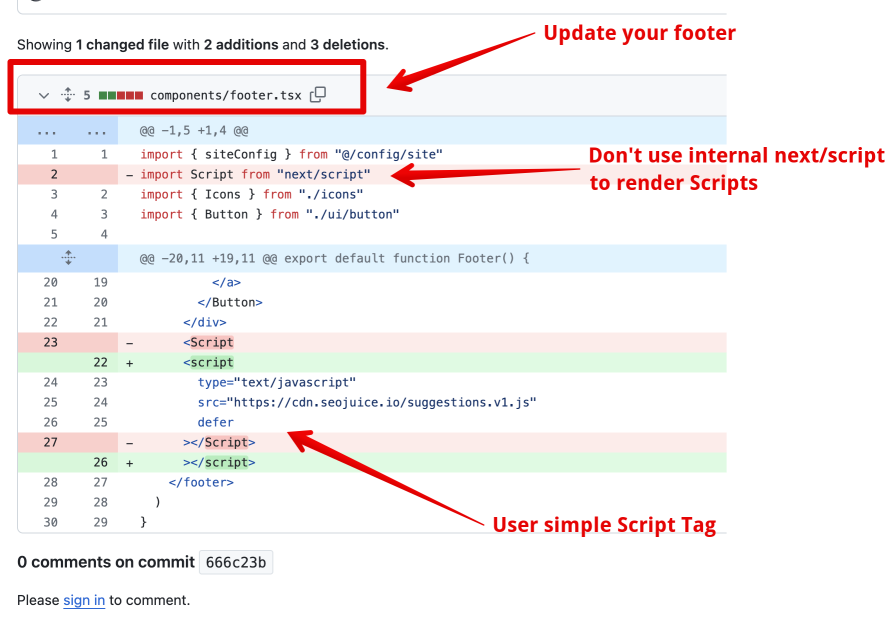
Implementation
Insert the snippet as a simple script tag in your layout or footer component:
<script type="text/javascript" src="https://cdn.seojuice.io/suggestions.v1.js" defer></script><noscript><img src="https://smart.seojuice.io/pixel" width="1" height="1" alt="" style="display:none"></noscript>For Next.js App Router, add it to your root layout.tsx:
export default function RootLayout({ children }) { return ( <html lang="en"> <body> {children} <script type="text/javascript" src="https://cdn.seojuice.io/suggestions.v1.js" defer /> <noscript> <img src="https://smart.seojuice.io/pixel" width="1" height="1" alt="" style={{display: 'none'}} /> </noscript> </body> </html> );}The script will do the rest once you’ve added your website in the dashboard.
Verify Your Integration
After adding the script:
- Open your site in a browser and press F12 to open DevTools
- Go to the Network tab and reload the page
- Filter for
seojuiceorsuggestions - You should see a request to
cdn.seojuice.io/suggestions.v1.jswith status 200 - Check the SEOJuice dashboard — your site should show as connected
If you don’t see the request, check that:
- You’re using a plain
<script>tag, not the Next.js<Script>component - The script isn’t being blocked by a Content Security Policy
- Your build is deployed (not just running locally in dev mode)
Server-Side Rendering (Optional)
For additional SEO benefits, you can set up server-side rendering via Cloudflare Workers. This renders SEOJuice optimizations into the HTML before it reaches the browser, which can improve crawlability.
The JavaScript-only approach works well for most cases — Google renders JavaScript and treats dynamic links the same as static ones.
Troubleshooting
If you’re having issues, see Integration Verification for detailed troubleshooting steps.