
Next.js / React Integration
Steps to Integrate SEOJuice
- Open your favorite IDE
- Update your footer or your
app.tsx
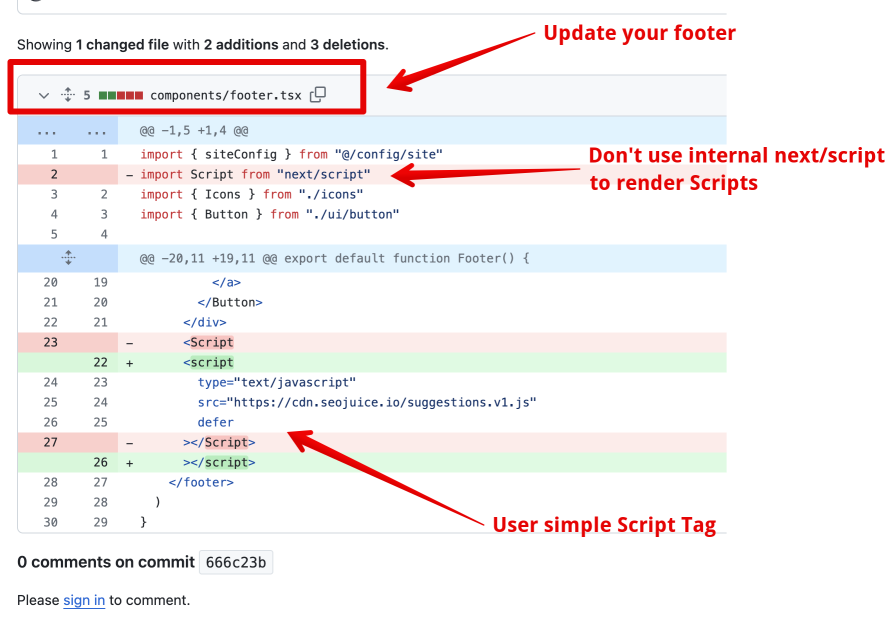
Implementation
Insert the snippet as a simple script tag in your layout or footer component:
<script type="text/javascript" src="https://cdn.seojuice.io/suggestions.v1.js" defer></script><noscript><img src="https://smart.seojuice.io/pixel" width="1" height="1" alt="" style="display:none"></noscript>For Next.js App Router, add it to your root layout.tsx:
export default function RootLayout({ children }) { return ( <html lang="en"> <body> {children} <script type="text/javascript" src="https://cdn.seojuice.io/suggestions.v1.js" defer /> <noscript> <img src="https://smart.seojuice.io/pixel" width="1" height="1" alt="" style={{display: 'none'}} /> </noscript> </body> </html> );}The script will do the rest once you’ve added your website in the dashboard.
Verify Your Integration
After adding the script:
- Open your site in a browser and press F12 to open DevTools
- Go to the Network tab and reload the page
- Filter for
seojuiceorsuggestions - You should see a request to
cdn.seojuice.io/suggestions.v1.jswith status 200 - Check the SEOJuice dashboard — your site should show as connected
If you don’t see the request, check that:
- You’re using a plain
<script>tag, not the Next.js<Script>component - The script isn’t being blocked by a Content Security Policy
- Your build is deployed (not just running locally in dev mode)
Server-Side Rendering (Optional)
For additional SEO benefits, you can set up server-side rendering via Cloudflare Workers. This renders SEOJuice optimizations into the HTML before it reaches the browser, which can improve crawlability.
The JavaScript-only approach works well for most cases — Google renders JavaScript and treats dynamic links the same as static ones.
Server-Side Rendering with the SDK
The client <script> applies optimizations in the browser, where a strict Content-Security-Policy or an ad-blocker can block it. To put the SEO in the HTML before it ships — CSP-proof and visible to every crawler — inject server-side with the seojuice SDK.
Install: npm install seojuice
Add one file — proxy.ts at your project root (middleware.ts on Next.js 13–15) — with the createSeoMiddleware helper from seojuice/next:
// proxy.ts — Next.js 16+ (runs on the Node.js runtime). On Next.js 13–15,// name the file middleware.ts and use `export const middleware` — same handler.import { createSeoMiddleware } from "seojuice/next";
export const proxy = createSeoMiddleware();
// Only run on real HTML routes — skip static assets, health checks, and _next internals.export const config = {  matcher: ["/((?!_next/|api/|favicon).*)"],};
That’s it. On every matched request the middleware fetches your page’s suggestions and injects them into the HTML before it reaches the browser or a crawler. It injects everything the client snippet would, and more:
<head>tags — title, meta description, meta keywords, and Open Graph tags, added only when the page doesn’t already have them (your own tags always win).- JSON-LD structured data — a valid
application/ld+jsonschema block. - Internal links — real
<a>elements in the body copy (with your configured link class), first occurrence only, never inside existing links or headings. - Image alt-text, content refreshes, h1, and broken-link fixes.
- A
<!-- seojuice: … -->manifest comment and thewindow.seojuiceSSRflag.
Safe by design. The middleware fails open — any fetch error, timeout, or malformed response returns your original HTML untouched, never a 500. It is re-entrancy-guarded (its own origin fetch won’t loop), size-capped, and idempotent (data-seojuice-* markers prevent double injection). International content is handled too — CJK keyword linking respects full-width sentence punctuation.
If you’d rather wire it by hand, the lower-level primitives are fetchSuggestions(url) → injectSEO({ html, suggestions }) (see the examples/ directory in the SDK). App Router users can also keep generateMetadata for <head> tags and use the middleware for body injection.
Not on Next.js? The same injection works from Node (Express), Python (Django / FastAPI), and PHP (Laravel) — see Server-Side SDKs.
Verify server-side injection worked by checking for window.seojuiceSSR === true in the rendered page (or the <!-- seojuice: … --> comment in View Source).
Content-Security-Policy
If you keep the client snippet alongside SSR (or run a strict CSP), allowlist SEOJuice so the browser fetch isn’t blocked:
script-src https://cdn.seojuice.ioconnect-src https://smart.seojuice.io https://cdn.seojuice.io
Server-side injection alone needs no CSP changes — it never runs in the browser.
Troubleshooting
If you’re having issues, see Integration Verification for detailed troubleshooting steps.