
Find Content Gaps
By the end of this guide, you’ll know which keywords your competitors rank for that you’re missing.
Prerequisites: Analyze your competitors to have competitor tracking set up.
Step 1: Open a competitor’s keyword analysis
From the Competitor Analysis page, click on any competitor’s tab. You’ll see their full keyword profile with columns for keyword, search intent, volume, their position, your position, and difficulty.
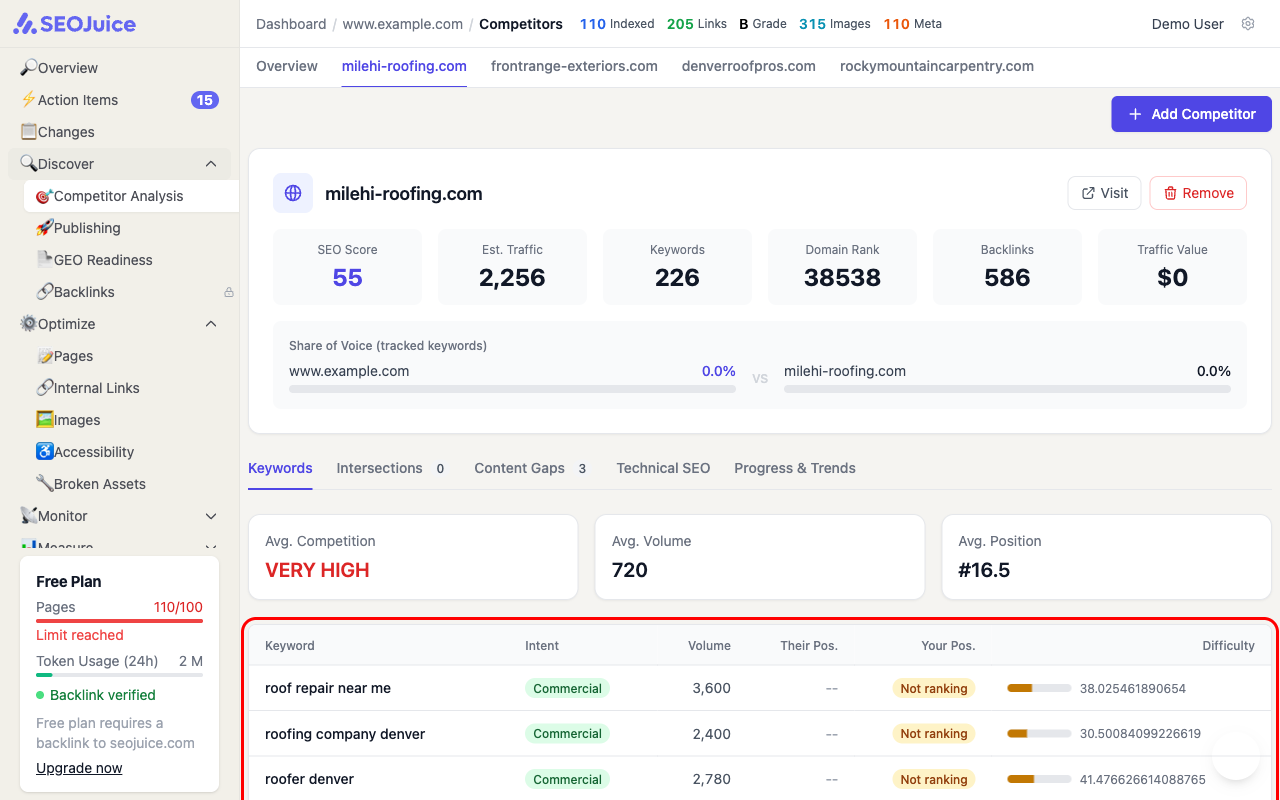
Keywords where your position shows “Not ranking” are your content gaps — topics where the competitor has visibility and you don’t.
Step 2: Navigate to Content Gaps tab
Click the Content Gaps tab to see only the keywords where this competitor ranks and you don’t. Each gap shows:
- Keyword — the search term you’re missing
- Intent — commercial, informational, or navigational
- Volume — monthly search volume
- Difficulty — how hard it is to rank for this keyword
Step 3: Prioritize gaps
Focus on gaps that have:
- High volume — more potential traffic
- Low difficulty — easier to rank for
- Commercial intent — more likely to drive conversions
What to expect
Content gaps update as competitor rankings change. Use this data to inform your content strategy — each gap is a topic where creating or improving a page could capture traffic your competitors currently own.
Next step: Build topic clusters to organize your content for maximum topical authority.