
Set Up Automation Levels
By the end of this guide, you’ll have configured automation levels for each SEOJuice feature.
Prerequisites: Fix accessibility issues to understand the types of changes SEOJuice can make.
Step 1: Open optimization settings
Navigate to Settings from the sidebar and scroll to the Automation Spectrum section. Here you control the automation level for each feature independently.
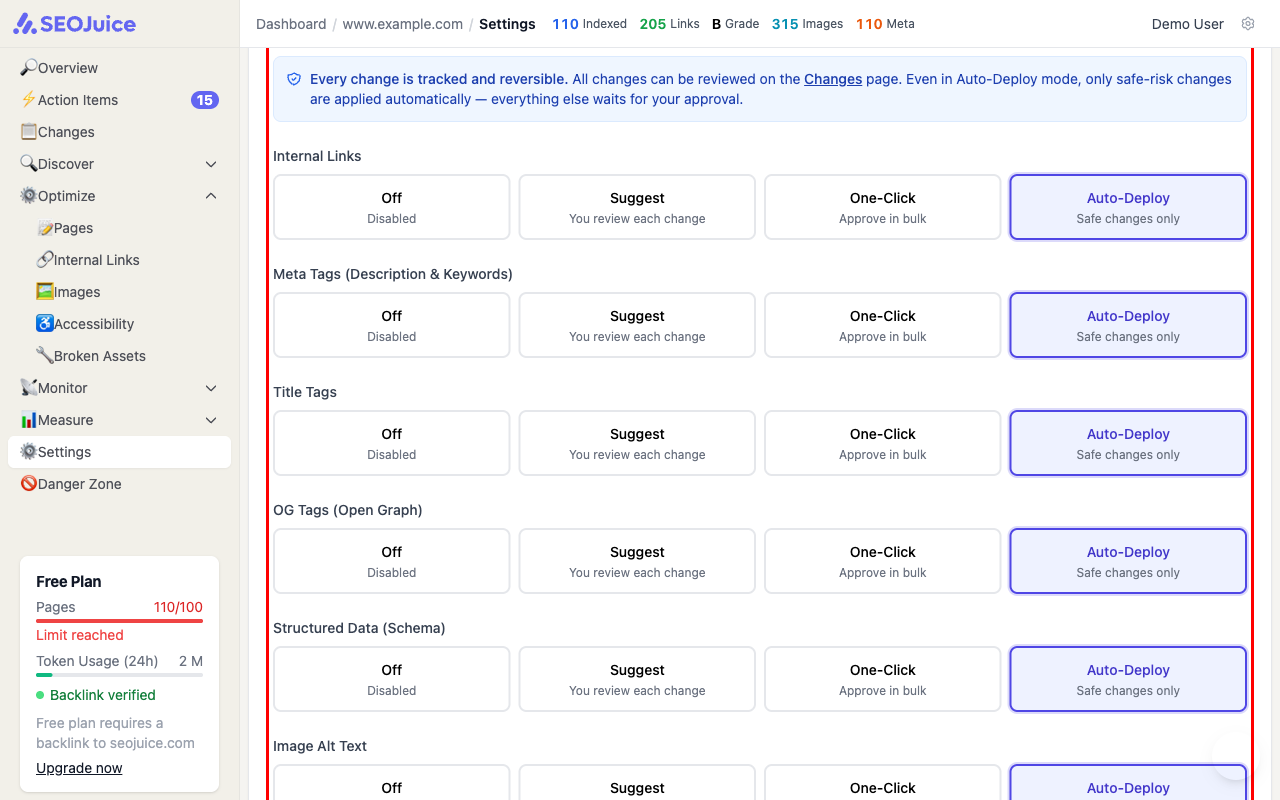
Step 2: Choose your level per feature
Each feature has four automation modes:
- Off — no changes are generated for this feature
- Suggest — changes are generated and wait for your individual review
- One-Click — review and approve changes in bulk from the dashboard
- Auto-Deploy — safe, low-risk changes are applied automatically; anything flagged as risky still waits for your approval
You can set different levels for different features. For example, you might auto-deploy internal links but manually review title tag changes.
Guardrails
Below the automation controls, you can set daily limits:
- Max changes per page/day — prevents too many changes on a single page
- Max changes per site/day — caps the total daily changes across your site
These guardrails ensure SEOJuice makes changes at a pace you’re comfortable with.
What to expect
Start with “Suggest” mode to review changes manually and build confidence. Once you trust the quality, switch to “Auto-Deploy” for hands-free optimization. You can change automation levels at any time — the setting takes effect on the next crawl.
Next step: Ready to grow? Analyze your competitors to see how you compare.