
Review Your Page Scores
By the end of this guide, you’ll know how to find and interpret page-level scores across your site.
Prerequisites: Understand your domain health for context on how page scores contribute to your overall health.
The pages list
Open Optimize > Pages from the sidebar. You’ll see every page SEOJuice has crawled, with columns for score, search data, and trends.
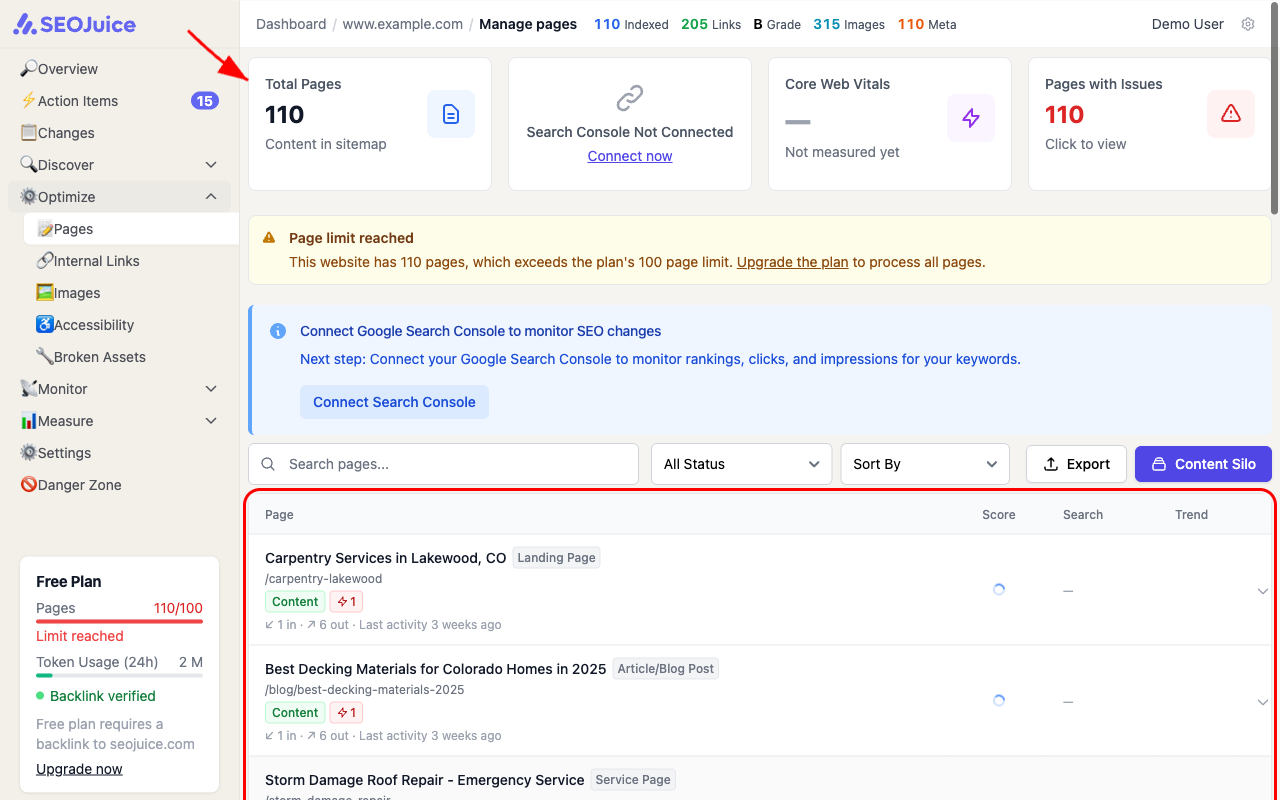
Each row shows:
- Page title and URL — what the page is and where it lives
- Page type — detected classification (Article, Landing Page, Service Page, etc.)
- Tags — Content (is a content page), Key Page (high-traffic or high-value), issue count
- Link activity — incoming and outgoing internal link counts
- Score — the page’s overall SEO health score (circular gauge)
- Search — click and impression data from Google Search Console (when connected)
Filtering and sorting
Use the controls above the table to focus on what matters:
- Search — find a specific page by name or URL
- Status filter — show only pages with issues, key pages, content pages, or excluded pages
- Sort — order by recently updated, most links, most impressions, or priority
Key page indicators
Some pages carry special tags:
- Key Page — SEOJuice detected this as a high-value page (homepage, main service pages, top-traffic pages)
- Content — this page has substantial content that SEOJuice can optimize
- Not Content — utility pages (privacy policy, terms, etc.) that don’t need content optimization
What to expect
Click any page row to open its detail view, where you’ll see the full health score breakdown, keyword data, and specific optimization suggestions. Page scores update automatically after each crawl.
Next step: Understand your content quality to see how your content stacks up.