
Improve Internal Linking
By the end of this guide, you’ll know how to review link suggestions, approve them, and monitor active links.
Prerequisites: Fix broken links to clean up your link profile first.
Step 1: Open internal links
Navigate to Optimize > Internal Links from the sidebar. You’ll see an overview of all links SEOJuice has generated and their current status.
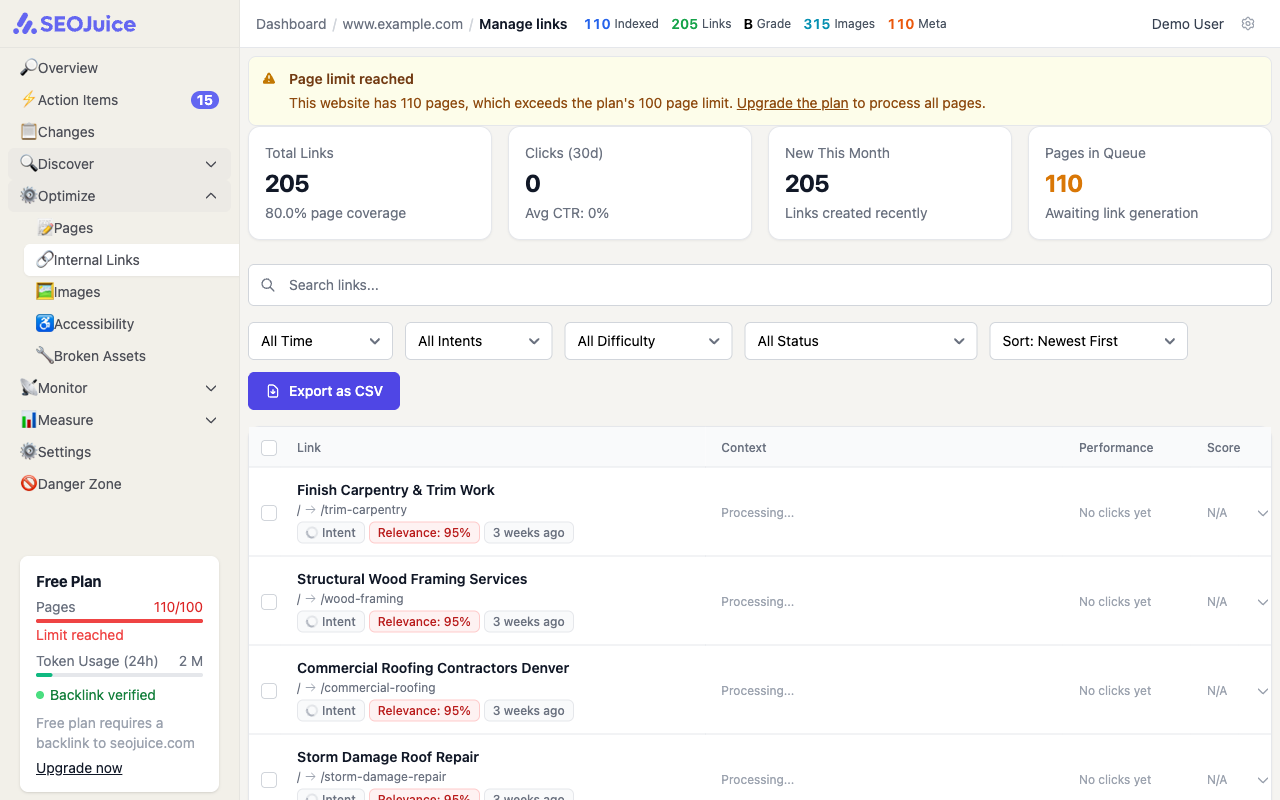
The table shows each link’s:
- Source page — where the link is placed
- Anchor text — the clickable text
- Target page — where the link points to
- Status — active, pending, or rejected
- Clicks — how many times visitors have clicked this link
Step 2: Review link suggestions
SEOJuice analyzes your content semantically to suggest links between topically related pages. Each suggestion shows the source page, proposed anchor text, and target page.
You can:
- Approve — the link goes live on your site through the snippet
- Reject — the suggestion is dismissed
- Edit — change the anchor text before approving
Step 3: Monitor active links
Active links appear on your site automatically through the snippet. The clicks column shows engagement — links that get clicked are helping users navigate your content and distributing authority to important pages.
What to expect
SEOJuice generates new link suggestions after each crawl as it discovers new content relationships. The number of suggestions depends on your content volume and topical diversity. Links are injected dynamically via the snippet — they don’t modify your source code.
Next step: Fix accessibility issues to improve your site’s usability for all visitors.