Track Your Backlink Profile
By the end of this guide, you’ll know how to monitor your backlink profile and track changes over time.
Prerequisites: Generate content — quality content attracts backlinks naturally.
Step 1: Open backlinks
Navigate to Discover > Backlinks from the sidebar. The backlink monitoring hub has seven tabs covering different aspects of your link profile.
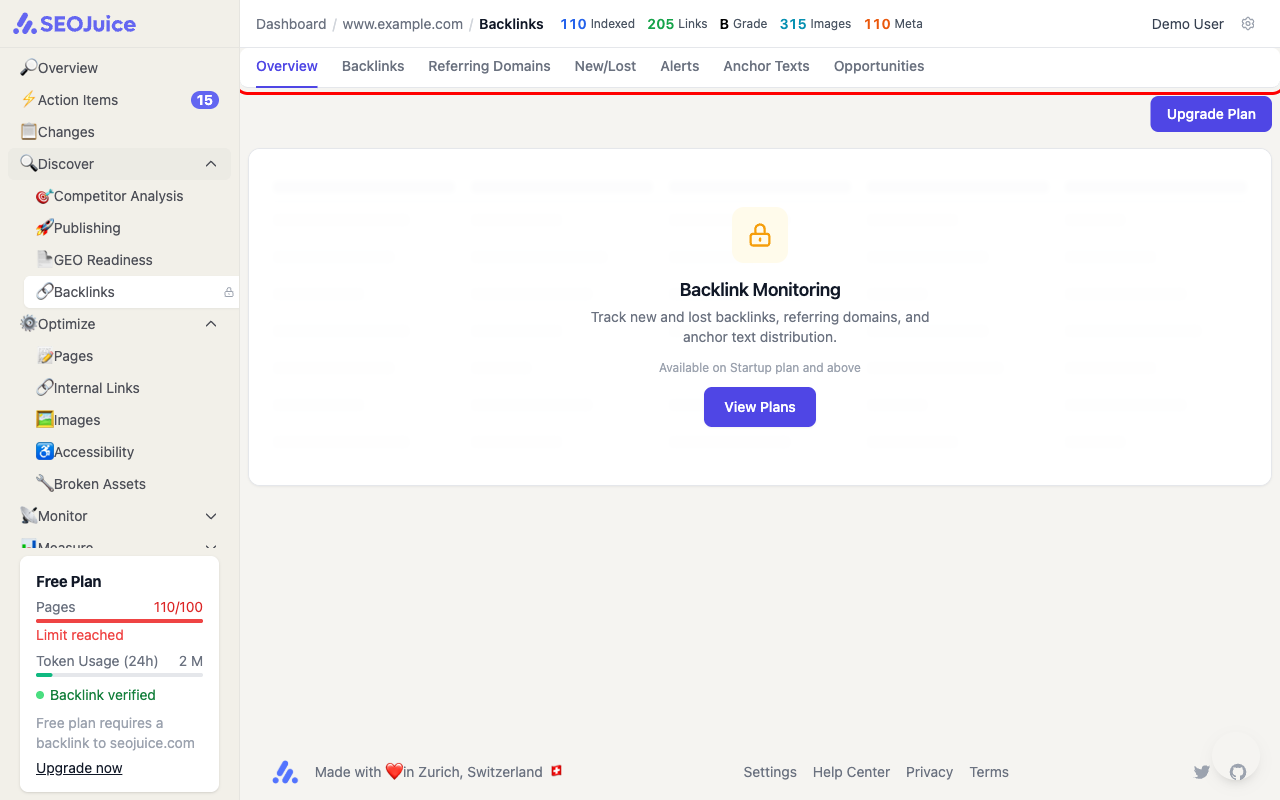
The tabs include:
- Overview — summary metrics and trends
- Backlinks — full list of individual backlinks
- Referring Domains — unique domains linking to you
- New/Lost — recently gained or lost backlinks
- Alerts — notifications about significant changes
- Anchor Texts — distribution of link anchor text
- Opportunities — potential backlink targets
Step 2: Monitor key metrics
Focus on these metrics to assess your backlink health:
- Total backlinks — raw count of links pointing to your domain
- Referring domains — unique domains (more important than total count)
- Dofollow ratio — percentage of links passing authority
- Domain authority distribution — quality of linking domains
Step 3: Track new and lost backlinks
The New/Lost tab shows recent changes. New high-quality backlinks boost your domain authority. Lost backlinks from important sources may explain ranking drops.
What to expect
Backlink monitoring is available on the Startup plan and above. Data updates regularly as SEOJuice scans for new and lost links. Building a strong backlink profile takes time — focus on creating link-worthy content and monitoring your progress here.
Next step: Optimize for local search if your business serves a specific geographic area.