
Fix Accessibility Issues
By the end of this guide, you’ll know how to interpret your accessibility score and address violations.
Prerequisites: Improve internal linking to understand how SEOJuice applies changes to your site.
Step 1: Open accessibility overview
Navigate to Optimize > Accessibility from the sidebar. You’ll see your site’s accessibility score and a breakdown by category.
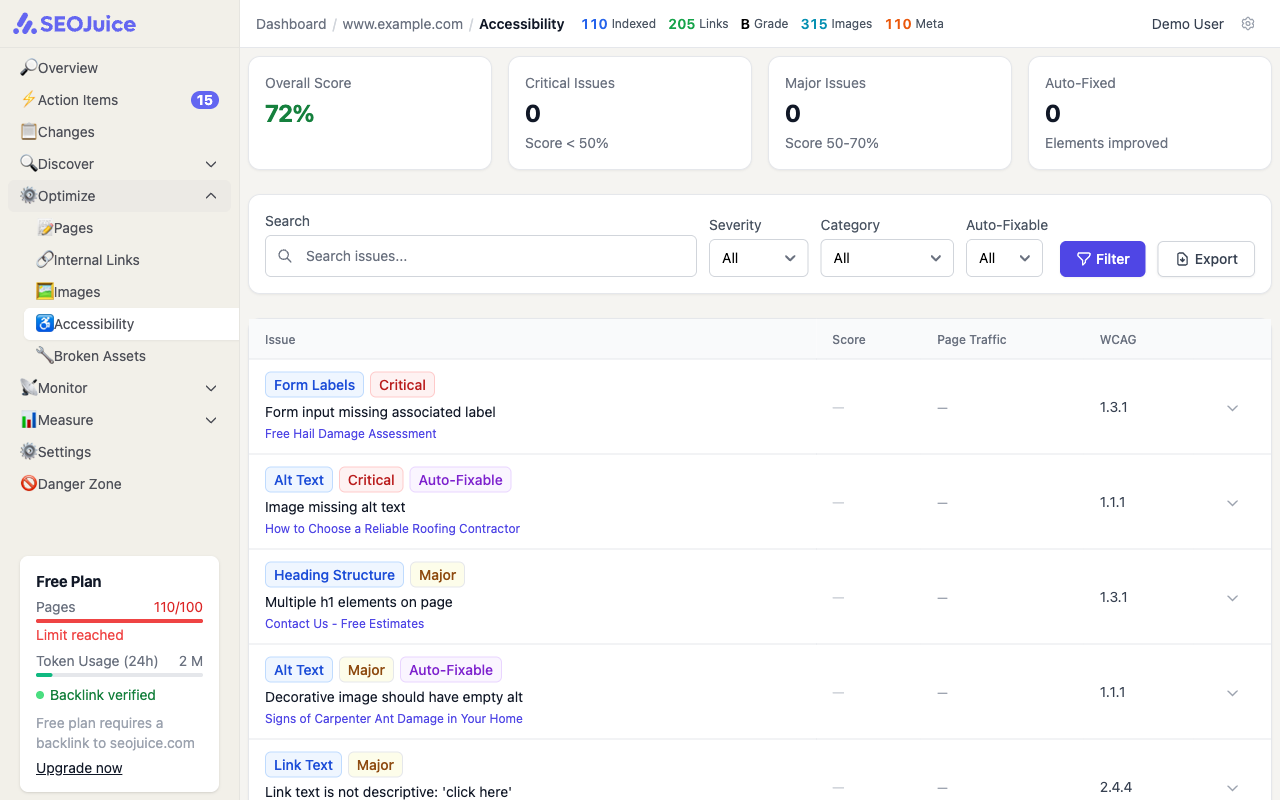
The score is a weighted composite of six categories:
- Alt Text (20%) — images with descriptive alternative text
- Form Labels (20%) — form inputs with associated labels
- ARIA Labels (20%) — interactive elements with proper ARIA attributes
- Link Text (15%) — links with descriptive text (not “click here”)
- Headings (15%) — proper heading hierarchy (h1 > h2 > h3)
- Contrast (10%) — sufficient color contrast ratios
Step 2: Review individual issues
Below the overview, each issue lists:
- WCAG criteria — the specific guideline being violated (e.g., WCAG 2.1 Level AA)
- Affected elements — which HTML elements on which pages
- Severity — critical, serious, moderate, or minor
SEOJuice automatically fixes certain issues through the snippet — adding ARIA labels, skip navigation links, and focus indicators. Issues that require code changes on your site are flagged for manual attention.
What to expect
Accessibility scores improve as you fix violations and as SEOJuice auto-applies fixes through the snippet. Focus on critical and serious issues first — they have the biggest impact on usability. Scores update after each crawl.
Next step: Set up automation levels to control how much SEOJuice does automatically.