
Analyze Your Competitors
By the end of this guide, you’ll know who your SEO competitors are and how you compare.
Prerequisites: Set up automation to have your optimization workflow in place.
Step 1: Open competitor analysis
Navigate to Discover > Competitor Analysis from the sidebar. SEOJuice auto-discovers competitors based on keyword overlap — sites that rank for the same terms you do.
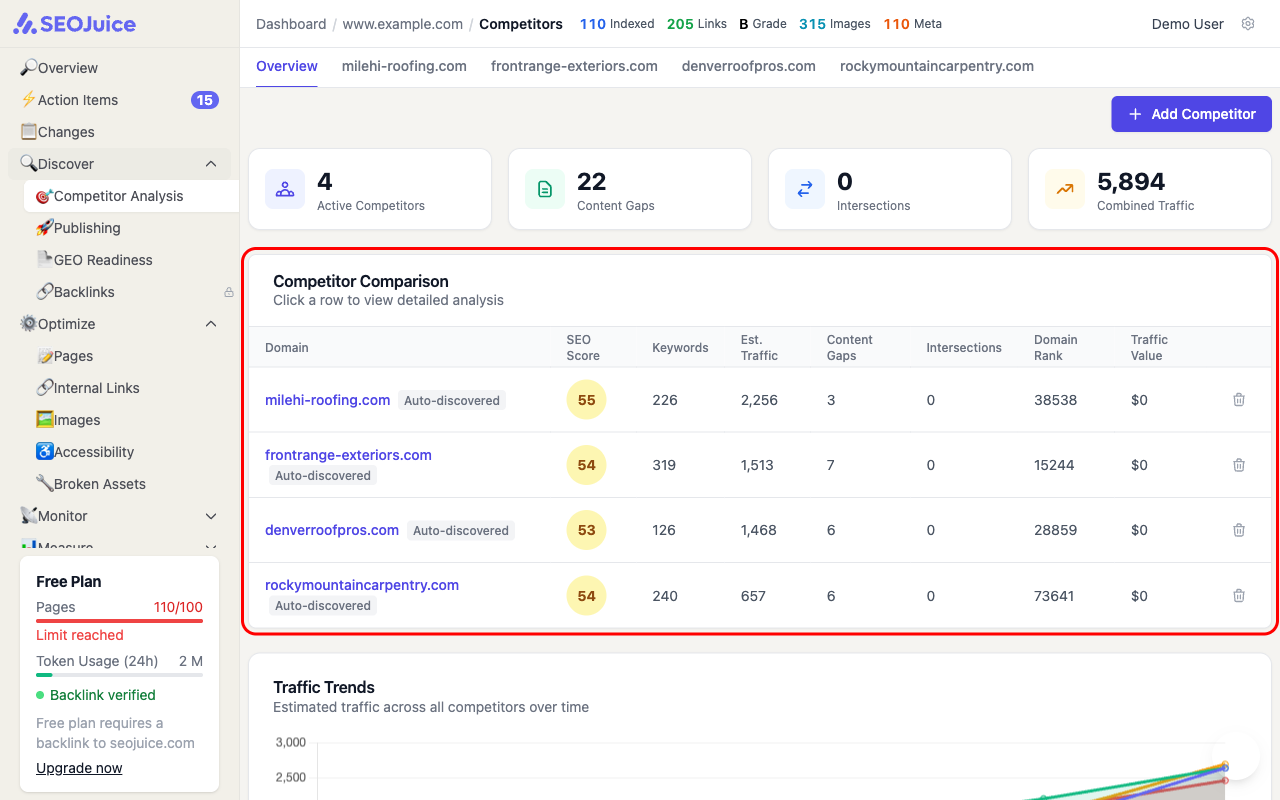
The overview shows:
- Active Competitors — how many competitors are being tracked
- Content Gaps — keywords they rank for that you don’t
- Intersections — keywords you both rank for
- Combined Traffic — total estimated traffic across all competitors
Step 2: Compare metrics
The comparison table shows each competitor’s SEO score, keyword count, estimated traffic, and domain rank. Click any row to see a detailed breakdown including:
- Share of Voice — how your keyword visibility compares to theirs
- Keywords — their full keyword list with positions and volume
- Content Gaps — keywords they rank for that you’re missing
- Technical SEO — how their technical setup compares to yours
Step 3: Add your own competitors
Click Add Competitor to manually add a competitor domain. SEOJuice will analyze their keyword profile and show you how they compare within a few minutes.
What to expect
Competitor data updates regularly as SEOJuice tracks ranking changes. Use this page to monitor shifts in your competitive landscape — if a competitor starts ranking for keywords you care about, you’ll see it here.
Next step: Find content gaps to discover keywords your competitors rank for that you don’t.